Monday, 4 February 2019

Active Directory Interview Questions and Answers -1

1) Mention what is Active Directory?
An active directory is a directory structure used on Microsoft Windows based servers and computers to store data and information about networks and domains.
2) Mention what are the new features in Active Directory (AD) of Windows server 2012?
  • dcpromo (Domain Controller Promoter) with improved wizard: It allows you to view all the steps and review the detailed results during the installation process
  • Enhanced Administrative Center: Compared to the earlier version of active directory, the administrative center is well designed in Windows 2012. The exchange management console is well designed
  • Recycle bin goes GUI: In windows server 12, there are now many ways to enable the active directory recycle bin through the GUI in the Active Directory Administrative Center, which was not possible with the earlier version
  • Fine grained password policies (FGPP): In windows server 12 implementing FGPP is much easier compared to an earlier  It allows you to create different password policies in the same domain
  • Windows Power Shell History Viewer: You can view the Windows PowerShell commands that relates to the actions you execute in the Active Directory Administrative Center UI
3) Mention which is the default protocol used in directory services?
The default protocol used in directory services is LDAP ( Lightweight Directory Access Protocol).
4) Explain the term FOREST in AD?
Forest is used to define an assembly of AD domains that share a single schema for the AD.  All DC’s in the forest share this schema and is replicated in a hierarchical fashion among them.
5) Explain what is SYSVOL?
The SysVOL folder keeps the server’s copy of the domain’s public files.  The contents such as users, group policy, etc. of the sysvol folders are replicated to all domain controllers in the domain.

6) Mention what is the difference between domain admin groups and enterprise admins group in AD?
                Enterprise Admin Group             Domain Admin Group
  • Members of this group have complete control of all domains in the forest
  • By default, this group belongs to the administrators group on all domain controllers in the forest
  • As such this group has full control of the forest, add users with caution
  •  Members of this group have complete control of the domain
  • By default, this group is a member of the administrators group on all domain controllers, workstations and member servers at the time they are linked to the domain
  • As such the group has full control in the domain, add users with caution
7) Mention what system state data contains?
System state data contains
  • Contains startup files
  • Registry
  • Com + Registration Database
  • Memory page file
  • System files
  • AD information
  • SYSVOL Folder
  • Cluster service information
8) Mention what is Kerberos?
Kerberos is an authentication protocol for a network.  It is built to offer strong authentication for server/client applications by using secret-key cryptography.
9) Explain where does the AD database is held? What other folders are related to AD?
AD database is saved in %systemroot%/ntds. In the same folder, you can also see other files; these are the main files controlling the AD structures they are
  • dit
  • log
  • res 1.log
  • log
  • chk
10) Mention what is PDC emulator and how would one know whether PDC emulator is working or not?
PDC Emulators: There is one PDC emulator per domain, and when there is a failed authentication attempt, it is forwarded to PDC emulator.  It acts as a “tie-breaker” and it controls the time sync across the domain.
These are the parameters through which we can know whether PDC emulator is working or not.
  • Time is not syncing
  • User’s accounts are not locked out
  • Windows NT BDCs are not getting updates
  • If pre-windows 2000 computers are unable to change their passwords
11) Mention what are lingering objects?
Lingering objects can exists if a domain controller does not replicate for an interval of time that is longer than the tombstone lifetime (TSL).
12) Mention what is TOMBSTONE lifetime?
Tombstone lifetime in an Active Directory determines how long a deleted object is retained in Active Directory.  The deleted objects in Active Directory is stored in a special object referred as TOMBSTONE.  Usually, windows will use a 60- day tombstone lifetime if time is not set in the forest configuration.
13) Explain what is Active Directory Schema?
Schema is an active directory component describes all the attributes and objects that the directory service uses to store data.
14) Explain what is a child DC?
CDC or child DC is a sub domain controller under root domain controller which share name space
15) Explain what is RID Master?
RID master stands for Relative Identifier for assigning unique IDs to the object created in AD.
16) Mention what are the components of AD?
Components of AD includes
  • Logical Structure: Trees, Forest, Domains and OU
  • Physical Structures: Domain controller and Sites
17) Explain what is Infrastructure Master?
Infrastructure Master is accountable for updating information about the user and group and global catalogue.

Thursday, 19 April 2018

'Bitcoin Thief' Mastermind Fled to Sweden On Icelandic PM's Plane

iceland-Big-bitcoin-heist-sindri-thor-stefansson
A group of thieves stole around 600 powerful bitcoin mining devices from Icelandic data centers! - Yes you've heard it right they have stolen entire devices.


Icelandic Police had arrested 11 suspects as part of the investigation, one of which has escaped from prison and fled to Sweden on a passenger plane reportedly also carrying the Icelandic prime minister Katrin Jakobsdottir.


The stolen cryptocurrency-mining devices are still missing, and Icelandic police are monitoring high-energy consumption area across the nation in an attempt to locate the missing equipment.

According to the authorities, Guards at the prison did not report Stefansson missing until after the flight to Sweden had taken off.

"He had an accomplice. We are sure of that," Police Chief Gunnar Schram told online news outlet Visir.

The theft, which the law enforcement said is one of the biggest series of robberies Iceland has ever experienced, took place between late December and early January, while the arrests of 11 people were made in February.

Besides 600 bitcoin mining devices, the theft also included burglary of 600 graphics cards, 100 processors, 100 power supplies, 100 motherboards and 100 sets of computer memory.

Shortly after the arrest, the Reykjanes District Court expressed restraint and released nine people on bail, leaving only two people under arrest, which included the alleged incident's mastermind Stefansson.

Source: The Hacker News

Thursday, 21 September 2017

Hacking Air gaped computers using IR security cameras

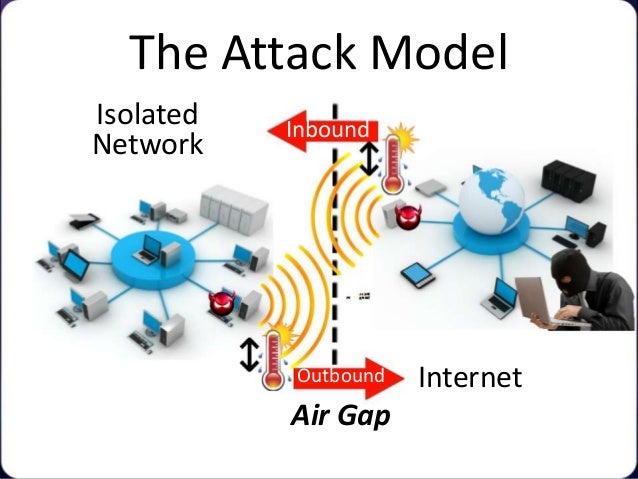
Image result for air gapped networkAir-gapped computers that are isolated from the Internet and physically separated from local networks are believed to be the most secure computers. which are difficult to infiltrate.

Researchers have developed a new attack scenario, dubbed aIR-Jumper, which includes an infected air-gapped computer (from which data needs to be stolen) and an infected CCTV network (that has at least one CCTV installed inside the premises facing the infected computer and one outside the premises), assuming that both networks are isolated from each other, and none of them is Internet-connected.

Ignoring the fact that how an air-gapped computer and CCTV network got infected with malware in the first place, the new research focused on, once infected, how the malware would be able to transfer the stolen data back to the attackers (waiting outside the premises).

To read and send data, the aIR-Jumper malware installed on air-gapped computer and CCTV network blink IR LEDs in morse-code-like patterns to transmit files into the binary data, i.e. 0 and 1.


The data from a video camera can be transmitted at 20 bits per second to an attacker at a distance of tens of meters away and from an attacker to a video camera at 100 bits per second, even in total darkness.

Since the attack is meant to steal files in binary data, attackers wouldn’t be able to steal any large files but could get their hands on passwords, cryptographic keys, PIN codes and other small bits of sensitive data stored on the targeted computer.
"In an infiltration scenario, an attacker standing in a public area (e.g., in the street) uses IR LEDs to transmit hidden signals to the surveillance camera(s)," the researchers say. "Binary data such as command and control (C&C) and beacon messages are encoded on top of the IR signals."
The researchers also published two videos demonstration, showing two attack scenarios.

In the first video, the researchers demonstrated how the malware installed on the air-gap computer collected data, converted it into binary and then blinked LED accordingly. At the same time, the infected camera captured this pattern and the malware installed on the camera converted the morse-code back into the binary data.

In the second video, another internally-connected camera installed outside the premises (in the parking area) transmitted the stolen binary data to the attackers sitting in the car using IR LED in morse-code-like patterns.


Here the infected CCTV camera is working as a bridge between the air-gapped computer and the remote attackers, offering a bi-directional covert channel.

It's not the first time Ben-Gurion researchers came up with the technique to target air-gapped computers. Their previous research of hacking air-gap computers include:

  • USBee attack that can be used steal data from air-gapped computers using radio frequency transmissions from USB connectors.
  • DiskFiltration attack that can steal data using sound signals emitted from the hard disk drive (HDD) of the targeted air-gapped computer;
  • BitWhisper that relies on heat exchange between two computer systems to stealthily siphon passwords or security keys;
  • AirHopper that turns a computer's video card into an FM transmitter to capture keystrokes;
  • Fansmitter technique that uses noise emitted by a computer fan to transmit data; and
  • GSMem attack that relies on cellular frequencies.


For more details on the latest aIR-Jumper attack, you can head onto the paper [PDF] titled, 'aIR-Jumper: Covert Air-Gap Exfiltration/Infiltration via Security Cameras & Infrared (IR).'

Source: The Hacker News 


Wednesday, 1 February 2017

Windows Server Interview Questions & Answers -001

Microsoft Windows Server Interview Questions & Answers 01


1)      Explain what is Windows Server?
Window server is a series of server operating system developed by Microsoft Corporation.
2)      Explain in windows DNS server what is Primary, Secondary and Stub zone?
In windows DNS server,Primary Zone: In this, the file is saved as normal text file with filename (.dns).Secondary Zone: It maintains a read-only copy of zone database on another DNS server.  Also, it acts as a back-up server to the primary server by providing fault tolerance and load balancingStub Zone: It consists of a copy of name server and SOA records which is used for reducing the DNS search orders.
3)      Explain what does IntelliMirror do?
IntelliMirror helps to reconcile desktop settings, applications and stored files for users especially for those users who move between workstations or those who works offline
4)      In the case when MSI file is not available, how you can install an app?
To add the application using the Software Installer.ZAP text file can be used rather than the windows installer
5)      Explain how you can set up a remote installation procedure without giving access to a user?

To do that, you have to go to,
Gponame >  User Configuration > Windows Settings > Remote Installation Services > Choice Options
6)      What does it mean by “tattooing” the Registry?
“ Tattooing” the registry means user can modify and view user preference that are not stored in the maintained portions of the Registry.  Even if the group policy is changed or removed, the user preference will still persist in the registry.
7)      Mention how many types of queries DNS does?
The types of queries DNS does areIterative QueryRecursive Query
8)      Explain what is the primary function of the domain controller?
Primary function of the domain controller is to validate users to the networks, it also provide a catalog of Active Directory Objects.
9)      What information is required when TCP/IP is configured on Window Server?
To configure a TCP/PI client for an IPv4 client, you have to provide the IP address and the subnet mask.
10)   Explain what does it mean caching-only server in terms of DNS?
The caching only DNS server provides information related to queries based on the data it contains in its DNS cache.
11)   Explain what is the way to configure the DHCP server such that it allocates the same IP address to certain devices each time the address is removed?
To configure the DHCP server, you can create a reservation for the device.  To create a reservation, you must know the MAC hardware address of the device.  To determine the MAC address for a network device you can use the ipconfig or nbs tat command line utilities.
12)     Explain what is LDAP?
To look up for the information from the server, e-mail and another program follows or uses the internet protocol. This protocol is referred as LDAP or Lightweight Directory Access Protocol.
13)   Explain what is SYSVOL folder?
It is a set of files and folders that is stored on the local hard disk of each domain controller in a domain and are replicated by the FRS ( File Replication Service).  These files contain group or user policy information.
14)   Explain what is the difference between a thread and a computer process?
Computer Process: In computing, a process is an instance of a computer program that is executed sequentially by a computer system which can run several computer programs concurrently.Thread: A thread is a several executable programs that work together as a single process.  For instance, one thread might send an error message to the user; another might handle error signals while the third thread might be executing the original action.
15)   Explain what is INODE?
INODE holds the metadata of files; INODE is a pointer to a block on the disk, and it is unique.In simple words, it is a unique number allocated to a file in UNIX-like OS.
16)   Explain what is RAID in Windows Server?
For storing same data at a different place RAID or Redundant Array of Independent Disks strategy is used. It is a strategy for building fault tolerance and increase the storage capacity. On separate drives it allows you to combine one or more volumes so that they are accessed by a single drive letter

17)   Explain what is the purpose of deploying local DNS servers?
A local DNS server provides the local mapping of fully qualified domain names to IP addresses.  To resolve remote requests related to the domains names on your network, local DNS servers can provide record information to remote DNS servers.
18)   To check TCP/IP configurations and IP connectivity, what are the two command line utilities that can be used?
Ipconfig: To check the computer’s IP configuration, command ipconfig can be used and also it can be used to renew the client’s IP address if it is provided by a DHCP server.Ping: To check the connection between the local computer and any of the other computer device on the network Ping command is used

19)   Explain if it is possible to connect Active Directory to other 3rd party Directory services?
Yes, you can connect other vendors directory services with Microsoft version.  By using dirXML or LDAP to connect to other directories.
20)   Explain where is the AD database is held?
AD database is saved in %systemroot%/ntds.  Files that controls the AD structure are ntds.dit edb.log res1.log res2.log edn.chk
21)   Explain what is the major difference between NTFS ( New Technology File System) or FAT (File Allocation Table) on a local server?
For local users FAT (File Allocation Table) and FAT32 provides security, while NTFS ( New Technology File System) provides security for domain users as well as local users.  NTFS provides file level security which is not possible through FAT32.
22)   Mention what windows server 2008 service is used to install client operating system over the network?
WDE ( Windows Deployment Services ) allows you to install client and server operating systems over the network to any computer with a PXE enabled network interface

Wednesday, 18 January 2017

Exam info RHCSA & RHCE

RHCSA- Redhat Certified System Administrator


RHCSA is an entry-level certification that focuses on actual competencies at system administration, including installation and configuration of a Red Hat Enterprise Linux system and attach it to a live network running network services.

Prerequisites/Candidate profile

  • IT support technician with a minimum of 1-year experience.
  • Hardware and networking (A+/N+) or equivalent knowledge
  • Windows OS basic knowledge is required
  • Exposure to Windows Server Administration will be an added advantage
Exam Pattern&Papers:


Few of the Publications you can make use of for this course as well as certification

See the best books for Redhat in Amazon:
http://amzn.to/2jp4HpI
Click on this to visit books page


Red Hat Certified System Administrator

 
An IT professional who has earned the Red Hat Certified System Administrator (RHCSA®) is able to perform the core system administration skills required in Red Hat Enterprise Linux environments. The credential is earned after successfully passing the Red Hat Certified System Administrator (RHCSA) Exam (EX200).

Prove your skills and knowledge

A Red Hat® Certified System Administrator (RHCSA) is able to perform the following tasks:
  • Understand and use essential tools for handling files, directories, command-line environments, and documentation
  • Operate running systems, including booting into different run levels, identifying processes, starting and stopping virtual machines, and controlling services
  • Configure local storage using partitions and logical volumes
  • Create and configure file systems and file system attributes, such as permissions, encryption, access control lists, and network file systems
  • Deploy, configure, and maintain systems, including software installation, update, and core services
  • Manage users and groups, including use of a centralized directory for authentication
  • Manage security, including basic firewall and SELinux configuration


The best way to learn is to do

In preparation to earn the Red Hat Certified System Administrator (RHCSA), Red Hat recommends the following:

-For Windows system administrators
  1. Red Hat System Administration I (RH124)
  2. Red Hat System Administration II (RH134)
-For Linux or UNIX administrators
  • RHCSA Rapid Track Course (RH199)
See the best books for Redhat in Amazon:
http://amzn.to/2jp4HpI
Click on this to visit books page


You can view other posts in this blog to download e-books and material related to Redhat v7 Certification 

Active Directory Interview Questions and Answers -1

1) Mention what is Active Directory? An active directory is a directory structure used on Microsoft Windows based servers and computers ...